애니빌드.LAB
토론방
디자인팜2.0 질문드립니다.
- w**oreepet
- 2018-01-04 17:06:19
- hit3449
- http://wdev.anybuild.co.kr/bbs/qna/6916
http://wooreepet.hyplanb.com
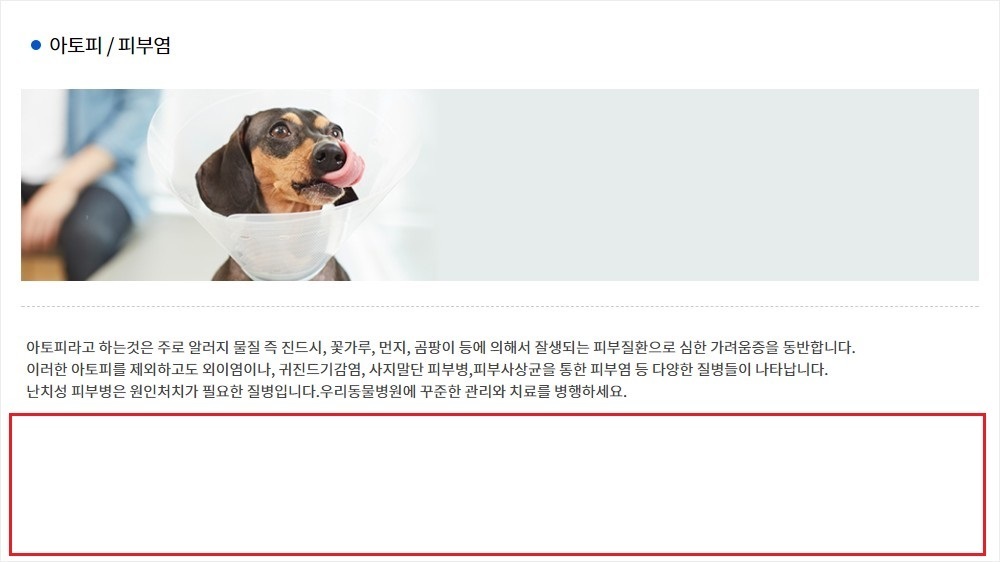
사진의 빨간네모칸의 여백을 제거하고 싶은데 방법이 궁금합니다.
게시글 공유
URL복사
댓글작성
열기 닫기
열기 닫기
서브페이지 내용출력부분 높이의 최소값이 500px 로 설정되어 있습니다.
[스킨 관리] 의 pc_skin_743_12.css 에서 다음을 수정해주세요.
/* PC CSS */
@media all and (min-width:102*px) {
/* 음성안내 */
#voice_guide_wrap {display:inline-block;vertical-align:top}
#voice_guide_wrap a {display:none;width:16px;height:40px;line-height:40px;font-size:0;text-align:center}
#voice_guide_wrap a > span {position:absolute;top:-9999px;left:-9999px;text-indent:-9999px}
#voice_guide_wrap a:before {font-family:'voice_icomoon';font-size:16px}
#voice_guide_wrap.off a.state_voice_on {display:inline-block}
#voice_guide_wrap.on a.state_voice_off {display:inline-block}
#voice_guide_wrap a.state_voice_on:before {
content:'\e903';color:#168fff;
transition:all 0.1s ease;
animation-name:voice_animation;
animation-duration:1s;
animation-iteration-count:infinite;
animation-timing-function:step-end;
}
#voice_guide_wrap a.state_voice_off:before {content:'\e902';color:#87909c}
/* PC viewport - Mobile content display none */
#header .logo button,
.shgroup > a {display:none}
/* PC display:block */
.gnb_p, .lnb_p, .shgroup > .shgroup_pc {display:block}
#header .header_form {display:inline-block}
#viewport > #sub_view #container > img.nav_img {display:block;width:100%;vertical-align:top}
/* PC 화면 넓이값을 가진 센터유지 */
#header .inner, #lnb_p, .gnb_p .inner, .sub_location, #footer .fnb, #footer .finfo, .shgroup, #sub_view .contents_wrap {margin:0 auto;max-width:1000px}
/* mypage 서브 네비게이션 넓이값 */
.snb {max-width:calc(1000px - 800px)}
#sub_view #container .contents_wrap .contents {min-height:500px;padding:30px 20px}