애니빌드.LAB
토론방
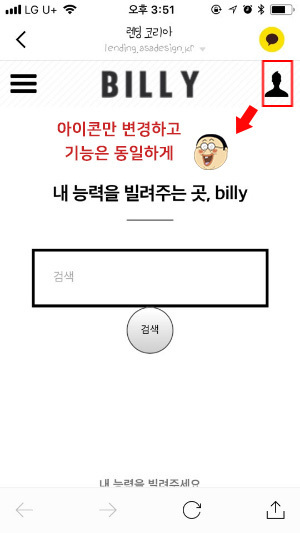
디자인팜2.0 모바일 우측 로그인아이콘-> 원하는 이미지로 변경하는 부분 문의
- 김**윤
- 2019-01-24 16:39:22
- hit3287
- http://wdev.anybuild.co.kr/bbs/qna/7156
이 계정뿐 아니라 공통사항인데요.
<button id="toggle_right"></button> 에 해당 되는 것 대신에 다른 아이콘을 넣고, 역할은 동일하게(즉, 사람모양 아이콘만 다른 아이콘으로) 바꾸고 싶습니다.
게시글 공유
URL복사
댓글작성
열기 닫기
열기 닫기
다음 페이지에서 CSS 를 수정해주세요.
[디자인팜 > 스킨 관리 > CSS소스 > pc_skin_793_210.css]
#header .logo button {position:absolute;top:0;bottom:0;width:50px;height:50px;margin:auto;border:none;background:none;font-size:0}
#header .logo button:before {font-family:'icomoon';position:absolute;top:0;right:0;bottom:0;left:0;margin:auto}
#header .logo #toggle_left {left:0}
#header .logo #toggle_left:before {content:'\e902&#**;;width:**px;height:**px;font-size:**px}
#header .logo #toggle_right {right:0}
#header .logo #toggle_right:before {content:'\e905';width:28px;height:28px;font-size:28px}
->
#header .logo button {position:absolute;top:0;bottom:0;width:50px;height:50px;margin:auto;border:none;background:none;font-size:0}
#header .logo button:before {font-family:'icomoon';position:absolute;top:0;right:0;bottom:0;left:0;margin:auto}
#header .logo #toggle_left {left:0}
#header .logo #toggle_left:before {content:'\e902&#**;;width:**px;height:**px;font-size:**px}
#header .logo #toggle_right {right:0;background-image:url(이미지 경로);background-size:50px 50px;}
- FTP 에 이미지를 업로드 하신후, 해당 이미지 경로를 위의 소스에 추가해주세요.
- 이미지는 2배 크기로 제작해야 모바일에서 선명하게 보입니다.
가로크기 : 100px
세로크기 : 100px